Send rates notices the way people actually check their mail.

Most councils still rely on printed notices. Payble delivers your notices where ratepayers already pay, and cuts your print and postage bill while doing it.

This has transformed how we connect with our ratepayers. The results speak for themselves.

Carmel Waters
Revenue Team Leader
Bega Valley Shire Council
Payble digital notices on laptop and mobile

Supproting over 75 councils deliver better payment experiences

Every paper notice costs you twice.
A $1 per email to send, again to chase

Eye crossed out icon representing no visibility
Flying blind

Once a notice hits the post, you have no idea if it was received, opened or acted on.

Hourglass icon representing slow update cycles
Slow to change

Every update to messaging, branding or compliance means another lengthy cycle with the mailing house.

Paper document icon representing static PDF notices
Stuck on paper

Static PDFs with no responsive design, no tap-to-pay and no self-serve pathway.

Crossed out bill icon representing payment friction
Hard to pay

Ratepayers can't search, store or pay from their notices. So they call you instead.

Payble digital notices template editor shown on a laptop

Drive enrolment to 90% with opt-in at payment

Residents go digital by default the moment they pay a rates or water bill. One platform handles the rest: design, approval, delivery, payment and tracking.

Design
Build notices in minutes

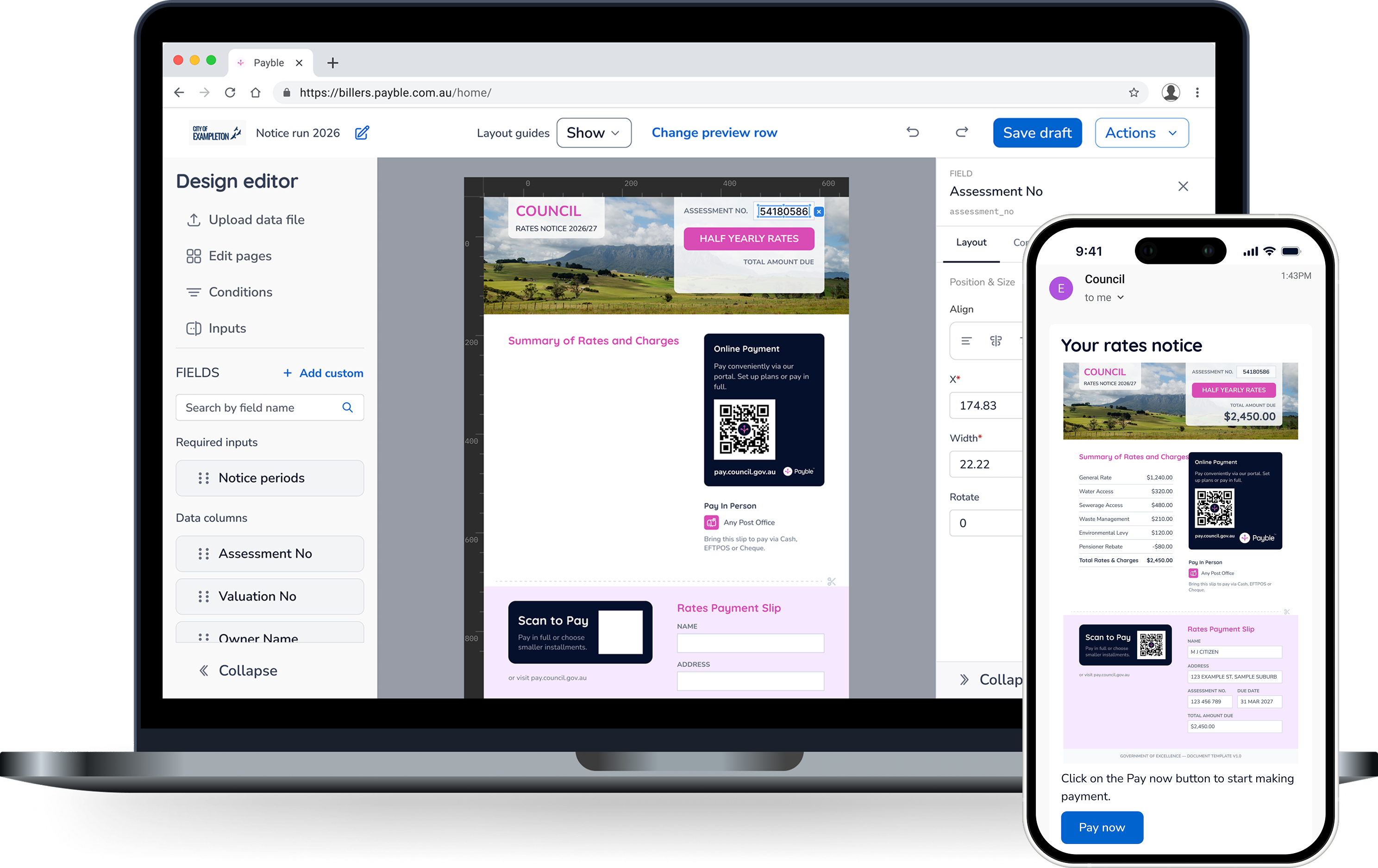
Design templates with drag-and-drop fields, conditional variants and proof generation before every run. No mailing house needed.

Drag-and-drop notice template designer on a laptop
Notice template pending review and approval workflow
Approve
Spend less time reviewing notices

A built-in approval workflow means every template is reviewed, signed off and locked before a single notice goes out.

reach
Reach residents on any device

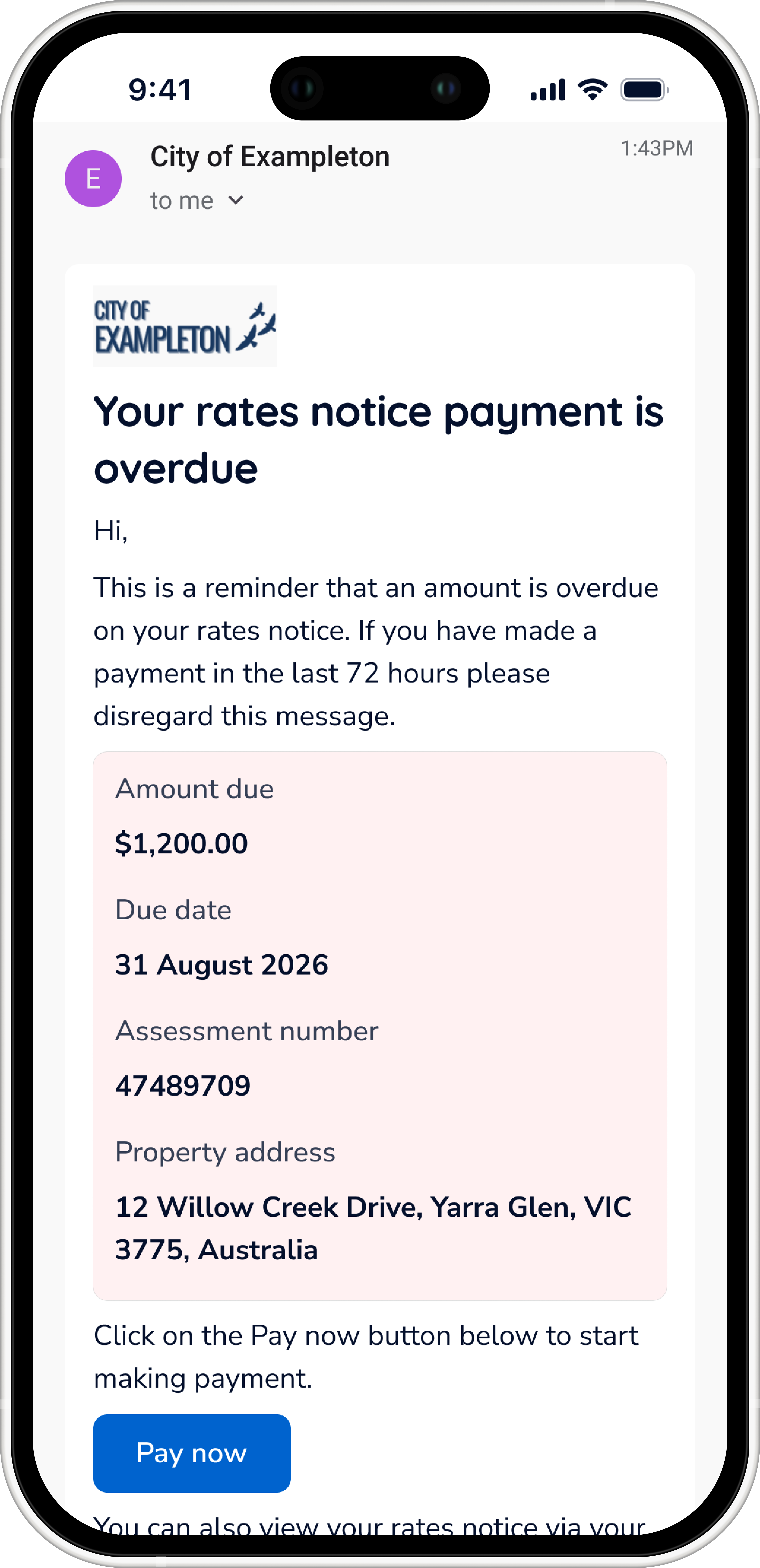
Notices land in the inbox and open on any device, with payment one tap away.

Digital notice displayed on laptop and mobile
Get Paid
Pay from your notice

Ratepayers go from notice to paid in seconds. No BPAY codes, no separate portals, no phone queues.

TRACK & REPORT
Remind automatically

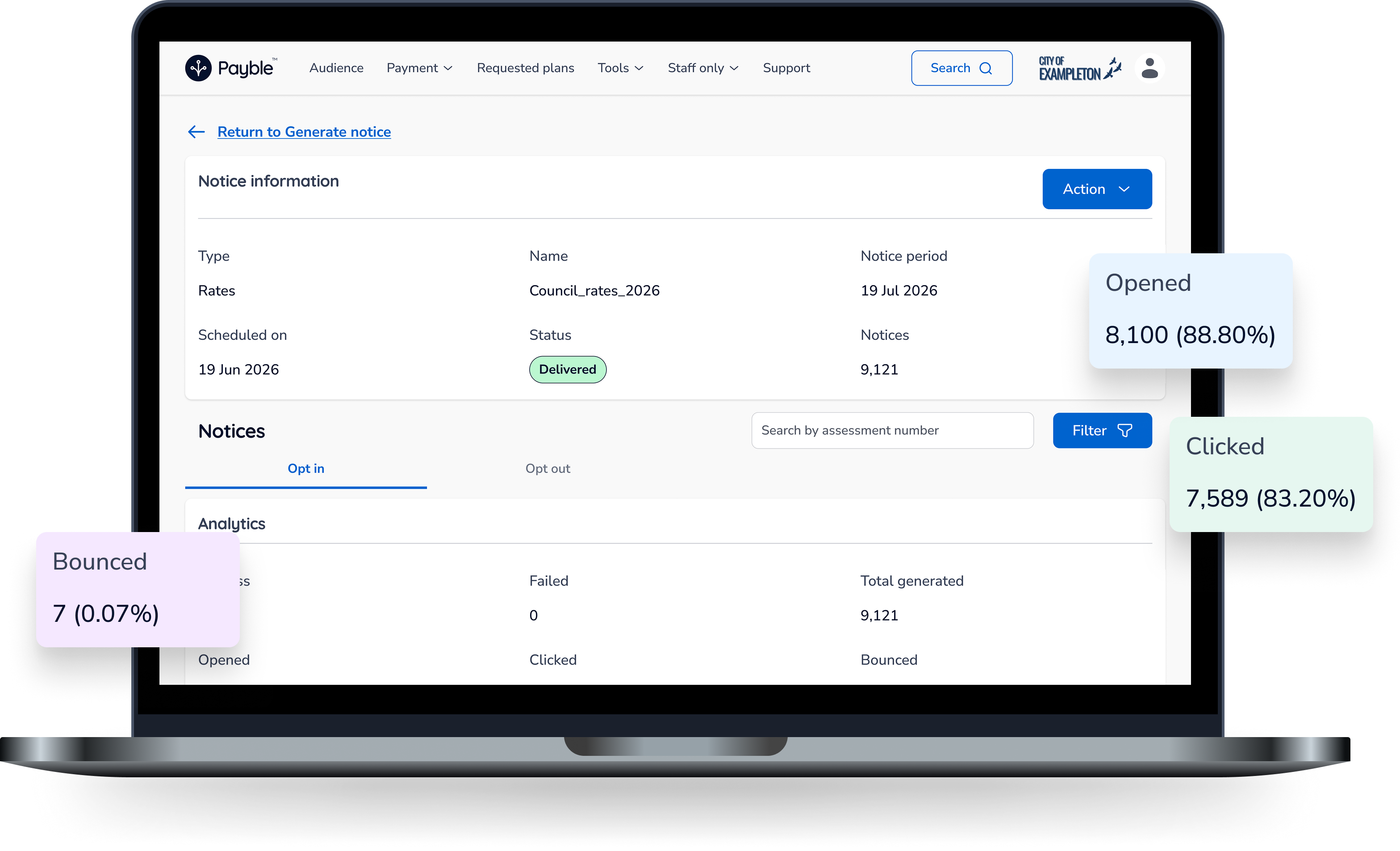
Pre-due and overdue reminders fire automatically. Runs with zero staff effort. Track sent, opened, clicked, bounced and failed sends.

Already using eNotices, Ezybill or eRates?

Switching isn't a project. Payble imports your existing digital notice data from any provider, so your enrolled ratepayers carry straight over. No re-enrolment, no starting from zero.

Ask Us About Migration in Your Walkthrough

Shield with user icon representing ratepayer privacyLocked to the right ratepayer, every time

Every ratepayer verifies their identity with a code from their own paper notice before anything goes digital. Every notice is access-controlled to its verified account holder, so statutory notices with personal and financial details never land in the wrong hands.

×

Frequently asked questions

Getting Started
How do ratepayers sign up for digital rates and water notices?

Ratepayers enrol themselves in minutes through the Payble app. They select their account, verify their identity using a code printed on their existing paper notice, confirm their email address and accept the terms. From that point, notices arrive by email instead of post, and their full notice history is available on demand. No forms, no phone calls, no council staff involved.

Can ratepayers receive digital notices for multiple properties?

Yes. Enrolment works per account, so a ratepayer can sign up for digital notices on every property they own. Each account is verified individually, and all notices then live in one place in the Payble app. This is especially useful for landlords and owners of multiple properties who currently juggle a stack of paper notices.

Can ratepayers opt out of digital notices?

Yes, at any time. Ratepayers can unlink an account from the Notices page in the Payble app and return to paper delivery. Council staff can also remove an enrolment on a ratepayer's behalf. Opting in is never locked in, which is exactly why ratepayers are comfortable making the switch.

Delivery & Recipients
Can someone else receive a copy of a ratepayer's notice?

Yes. The primary account holder can invite additional recipients, such as a partner, family member, accountant or property manager. Once the invited person accepts, they're CC'd on every future notice email automatically. The primary contact stays in control of who receives copies at all times.

What happens if a digital notice doesn't reach the ratepayer?

No notice goes missing. Every send is tracked, and any failed delivery is flagged immediately. Councils simply export the failed items and route them to their mailing house, so those ratepayers receive a physical copy instead. Bounced email addresses are automatically suppressed from future runs to protect delivery rates.

Security & Privacy
What verification is required to receive council notices by email?

Every ratepayer must verify their identity before receiving digital notices. They enter a unique verification code printed on their paper notice, which is matched against the account. Only after a successful match can they access notices for that account. This ensures notices are only ever delivered to the verified account holder, not just anyone with an email address.

How does Payble protect ratepayer privacy?

Every notice is locked to its verified account holder. Access is controlled through unique verification keys, meaning a ratepayer can only ever open notices for accounts they have personally verified. Combined with identity verification at enrolment, this ensures statutory notices containing personal and financial details are never exposed to the wrong person.

Still have questions? Ask them live.

Book a 15-Minute Walk-Through
Payble digital notices on laptop and mobile

Ready to see your notices in Action?

Book a 15-minute walk-through using a sample of your own rates or water notice data. Fifteen minutes now beats another year of postage.

Book a Demo